
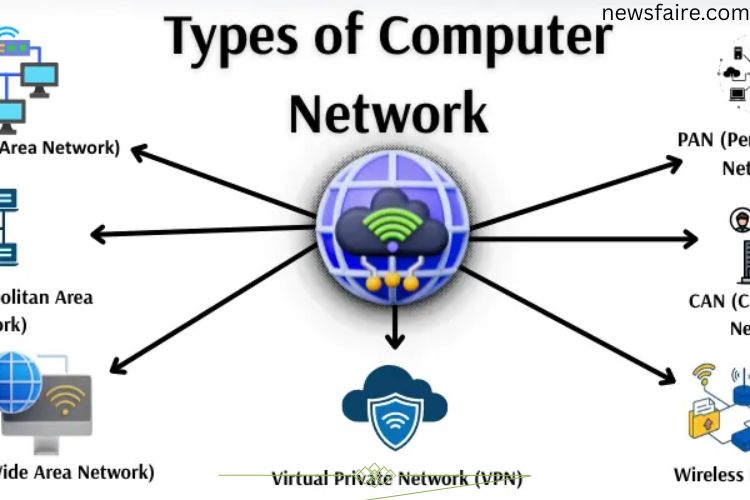
From smartphones to corporate servers, computer networks are the invisible threads that keep our digital world connected. Understanding the types of computer networks reveals how devices communicate, share resources, and maintain seamless operations across homes, offices, and cities.
What Are Computer Networks?
A computer network connects multiple devices, allowing them to share information and resources efficiently. Networks vary in size and purpose—from small home setups to global systems linking millions of devices. Some networks focus on speed and performance, while others prioritize reach and security.
Types of Computer Networks
Each network type is designed for specific environments and needs. Understanding these types helps organizations, students, and tech enthusiasts choose the right setup.
LAN (Local Area Network)
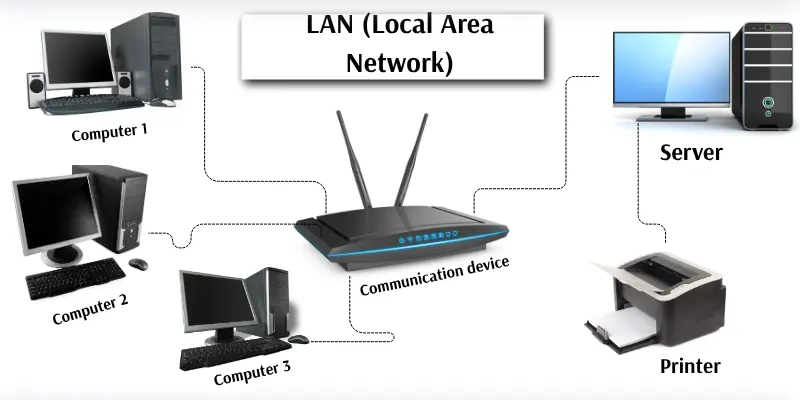
A LAN connects devices in a confined area, like homes, schools, or offices. It allows high-speed sharing of files, printers, and internet access. LANs use Ethernet cables or Wi-Fi and are usually managed by a central server.
Example: An office where all employee computers connect to a central server to access files and printers.
Advantages:
- Fast and reliable communication
- Efficient file and resource sharing
- Cost-effective for small setups
Disadvantages:
- Limited coverage area
- Server failure halts the network
- Setup and maintenance can be costly
MAN (Metropolitan Area Network)
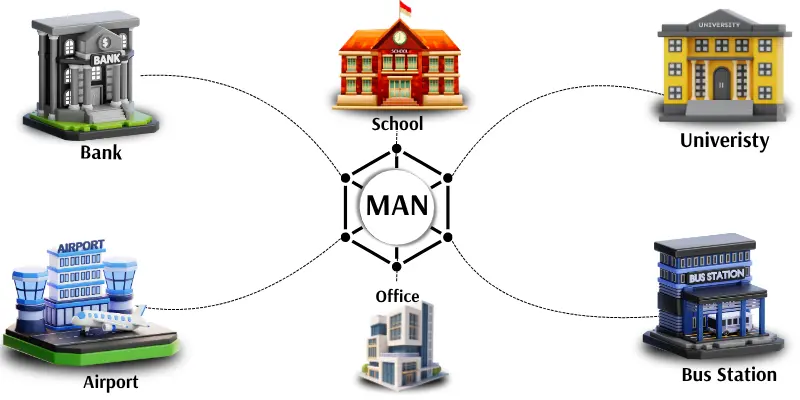
MAN networks span cities, linking multiple LANs for high-speed data sharing. Organizations like banks or city offices use MANs for regional connectivity.
Example: Connecting all branches of a bank within a single city.
Advantages:
- Covers large urban areas
- Links multiple LANs efficiently
- Supports high-speed communication
Disadvantages:
- Expensive setup and maintenance
- Technical support needed
- Security can be challenging
WAN (Wide Area Network)
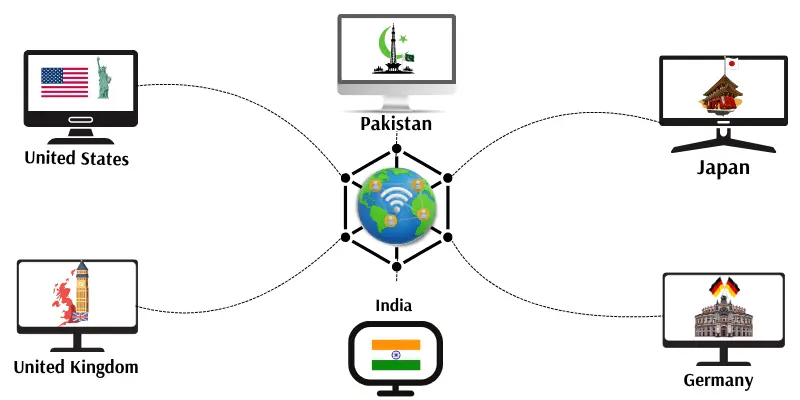
WANs connect networks across countries or continents. The Internet is the most common example. WANs use satellites, fibre optics, or telephone lines to enable global communication.
Example: The internet connects users across the world.
Advantages:
- Global coverage
- Facilitates worldwide communication
- Ideal for multinational businesses
Disadvantages:
- High cost to establish and maintain
- Slower speeds than LAN and MAN
- Vulnerable to security threats
PAN (Personal Area Network)
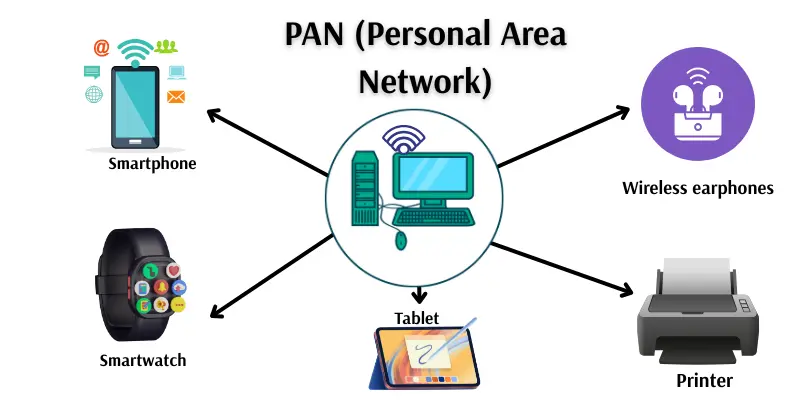
PANs connect personal devices over a short range, typically within a few meters. Common examples include smartphones, tablets, laptops, and Bluetooth devices.
Example: Connecting a phone to wireless earphones via Bluetooth.
Advantages:
- Easy to use
- Portable and low-cost
- No cables required
Disadvantages:
- Limited range and device capacity
- Lower data transfer speed
- Weak security
CAN (Campus Area Network)
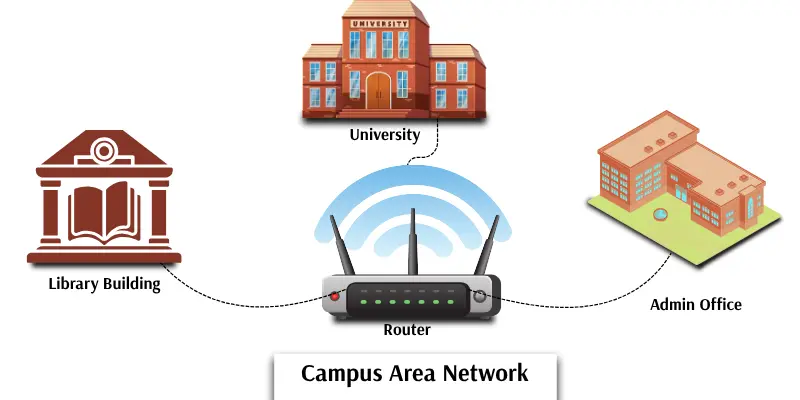
CANs cover entire campuses, linking multiple buildings for fast and reliable communication. Schools, universities, and colleges often use them.
Example: University labs, libraries, and administrative offices connected via a CAN.
Advantages:
- Reliable and high-speed network
- Efficient resource sharing
- Connects multiple buildings seamlessly
Disadvantages:
- Limited to a single campus
- Installation and maintenance can be expensive
- Requires technical staff
Wired Networks
Wired networks transmit data through cables, offering stable and secure connections. They are commonly found in offices, labs, and classrooms.
Example: Ethernet cables connecting computers in a school lab.
Advantages:
- Fast and stable connection
- Reliable for large data transfers
- Low hacking risk
Disadvantages:
- Installation can be costly and cumbersome
- Not suitable for mobile devices
- Cable clutter
Wireless Networks
Wireless networks connect devices using radio waves or signals, enabling mobility and convenience. They are widely used in homes, offices, and public areas.
Example: Using Wi-Fi to connect a phone and laptop at home.
Advantages:
- Easy installation and mobility
- Connects multiple devices simultaneously
- No cables required
Disadvantages:
- Slower than wired networks
- Signal affected by distance or obstacles
- Security risks if unprotected
Client-Server Networks
In this setup, a central server provides resources to client computers. Common in offices, schools, and large organizations, it centralizes data storage and management.
Example: Employees accessing files on a central office server.
Advantages:
- Centralized management
- Improved security
- Simplifies backups and updates
Disadvantages:
- Expensive setup
- Server failure impacts the entire network
- Requires expert management
Peer-to-Peer (P2P) Networks
P2P networks connect computers directly without a central server. Each device can act as both client and server. Ideal for small offices or home setups.
Example: Two home computers sharing files directly.
Advantages:
- Simple and inexpensive
- No central server required
- Easy file sharing
Disadvantages:
- Less secure
- Difficult to manage large networks
- Not suitable for big organizations
Public Networks
Public networks are open for anyone to use, such as free Wi-Fi in cafes or airports.
Advantages:
- Easy and free access
- Connects users globally
Disadvantages:
- Low security
- Slow speeds due to heavy traffic
- Vulnerable to hacking
Private Networks
Private networks are restricted to individuals or organizations, offering security and controlled access.
Example: A company’s internal network for employee use.
Advantages:
- Secure and controlled
- Fast internal communication
- Efficient resource management
Disadvantages:
- Expensive setup
- Limited access for outsiders
- Maintenance requires technical expertise
Virtual Private Networks (VPN)
VPNs create secure connections over public networks, protecting data and hiding user locations. Widely used for remote work and online privacy.
Example: Accessing an office network securely from home.
Advantages:
- Secures internet connections
- Protects sensitive data
- Enables remote access
Disadvantages:
- Can slow down internet speed
- Some VPNs require subscriptions
- Setup required before use
Wireless Sensor Networks (WSN)
WSNs consist of small sensors that collect data like temperature, light, or movement and send it to a central computer. Used in farms, smart cities, and hospitals for monitoring and automation.
Example: Smart city sensors monitoring air quality.
Advantages:
- Wireless and flexible
- Supports large-scale monitoring
- Automates data collection
Disadvantages:
- Limited range
- Requires power
- Costly for large deployments
Frequently Asked Questions:
What are computer networks?
Computer networks are systems that connect multiple devices to share information, resources, and internet access efficiently.
How many types of computer networks exist?
There are several types, including LAN, MAN, WAN, PAN, CAN, wired, wireless, client-server, peer-to-peer, public, private, VPN, and wireless sensor networks.
What is the main difference between LAN and WAN?
LAN covers a small area like a home or office with high-speed connections, while WAN spans countries or continents, connecting multiple networks globally.
Why are wireless networks important?
Wireless networks enable mobility, flexible connectivity, and easy access to devices without cables, making them ideal for homes, offices, and public spaces.
What is a VPN, and why is it used?
A Virtual Private Network (VPN) creates a secure connection over public networks, protecting your data and hiding your location for privacy and remote work.
What is the smallest type of network?
A Personal Area Network (PAN) is the smallest, connecting devices within a few meters of a single user, often via Bluetooth or Wi-Fi.
Which networks are best for large organizations?
WAN, MAN, and client-server networks are ideal for large organizations, enabling secure data sharing and connectivity across locations.
Conclusion
Computer networks are the backbone of our connected world, powering everything from simple home devices to global communication systems. Each type of network—whether LAN, WAN, VPN, or wireless sensor networks—serves a unique purpose, offering distinct advantages and challenges. Understanding these networks helps individuals and organizations choose the right solutions for speed, security, and efficiency. By exploring, connecting, and empowering devices through the right networks, we can enhance productivity, protect sensitive data, and stay seamlessly connected in today’s digital universe.