
Modern computing feels impossible without a computer mouse. This small yet powerful input device gives users precise control over the cursor, making everyday tasks faster and more efficient. From browsing the internet to designing graphics and playing games, the computer mouse remains an essential tool for students, professionals, and gamers alike.
Understanding how a computer mouse works, its types, features, and common problems helps users choose the right device and maintain it properly.
Read More: Mastering Printers: Unlock the Secrets to Effortless Printing and Ultimate Productivity
What Is a Computer Mouse?
A computer mouse is a handheld input device that controls the pointer on a computer screen. By moving the mouse across a flat surface, users can select, open, drag, and interact with digital content.
Most computer mice include:
- Left and right buttons
- A scroll wheel
- An internal sensor to detect movement
Each click sends a signal to the computer, allowing quick and accurate control. Because of its simplicity and effectiveness, the computer mouse remains one of the most widely used computer peripherals worldwide.
History of the Computer Mouse
The computer mouse was invented in 1964 by Douglas Engelbart. His goal was to make computers easier to use. The first mouse was made of wood and featured a single button.
During the 1970s, the design improved with better shapes and additional buttons. The 1980s marked a turning point when companies like Apple and Microsoft introduced graphical user interfaces that relied heavily on the mouse.
As technology advanced, mechanical ball mice were replaced by optical and laser mice. Today, wireless and ergonomic designs dominate the market, offering comfort and precision across various surfaces.
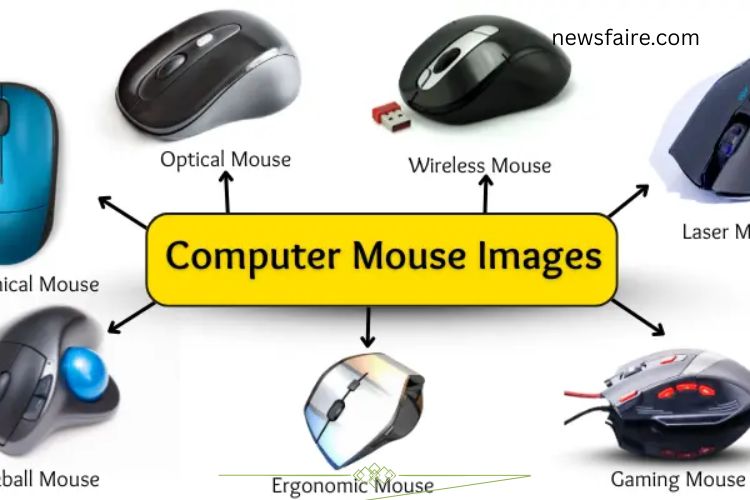
Types of Computer Mouse
Different types of computer mouse devices serve different needs. Choosing the right one depends on usage, comfort, and performance requirements.
Mechanical Mouse
Uses a rolling ball underneath to detect movement. Older technology, now rarely used.
Optical Mouse
Uses LED light to track movement. Offers smooth performance on most surfaces.
Laser Mouse
Uses laser technology for greater precision and sensitivity. Ideal for detailed work.
Wireless Mouse
Connects via Bluetooth or USB receiver. Eliminates cable clutter and improves portability.
Features a ball on top that users rotate with fingers. Reduces wrist movement.
Gaming Mouse
Designed for high performance with adjustable DPI, extra buttons, and faster response times.
Ergonomic Mouse
Built to reduce wrist strain and improve hand positioning for long hours of use.
How Does a Computer Mouse Work?
A computer mouse works by detecting movement and converting it into signals that move the cursor on the screen.
Step-by-Step Process
Movement Detection
The sensor inside the mouse tracks motion across a surface using light or laser technology.
Signal Transmission
The mouse sends movement data to the computer through a wired connection or wireless signal.
Cursor Movement
The computer processes the signals and moves the pointer accordingly.
Button Commands
Clicking buttons sends instructions such as select, open, or drag.
Scroll Function
Turning the scroll wheel allows vertical navigation through pages and documents.
This fast communication between hardware and software ensures accurate and responsive control.
Uses of a Computer Mouse
A computer mouse supports a wide range of tasks across different fields. Its versatility makes it indispensable in both personal and professional environments.
- Open files and programs
- Select text and objects
- Drag and drop items
- Scroll through webpages
- Play computer games
- Create digital drawings
- Edit documents
- Navigate software interfaces
Students use it for assignments, designers rely on it for creative projects, and gamers depend on it for speed and precision.
Parts of a Computer Mouse
Each component of a computer mouse plays a specific role in its operation.
- Left Button – Primary selection button used most frequently.
- Right Button – Opens context menus and additional options.
- Scroll Wheel – Enables vertical scrolling and sometimes clicking.
- Body/Case – Protects internal components.
- Sensor – Detects surface movement.
- Cable (Wired Mouse) – Connects the device to the computer.
- Battery (Wireless Mouse) – Powers the device.
- LED or Laser Light – Assists movement detection.
Together, these parts ensure smooth and accurate performance.
Common Computer Mouse Problems and Solutions
Like any device, a computer mouse may encounter issues. Fortunately, most problems are easy to fix.
- Pointer Not Moving
- Check cable connection or USB port.
- Replace batteries in wireless models.
- Restart the computer.
- Slow Cursor Movement
- Clean the sensor area.
- Adjust pointer speed in settings.
- Buttons Not Responding
- Test the mouse on another device.
- Replace if hardware failure is confirmed.
- Scroll Wheel Not Working
- Clean around the wheel.
- Update mouse drivers.
- Frequent Disconnection
- Try a different USB port.
- Replace batteries or check Bluetooth connection.
- Cursor Jumping
- Use a clean, smooth mouse pad.
- Remove dust from the sensor.
- Regular maintenance prevents most performance issues.
- Mouse Cleaning Tools
Dust and debris can affect mouse performance. Using proper cleaning tools extends its lifespan and improves accuracy.
- Microfiber Cloth – Removes surface dust and fingerprints.
- Compressed Air – Clears debris from tight spaces.
- Cotton Swabs – Cleans small gaps carefully.
- Isopropyl Alcohol – Disinfects and removes sticky residue.
- Soft Brush – Sweeps away loose particles.
- Cleaning Gel – Lifts dirt from crevices.
Cleaning your computer mouse regularly ensures smoother operation and better hygiene.
Advantages of a Computer Mouse
A computer mouse offers numerous benefits:
- Fast and precise pointer control
- Easy navigation
- Efficient text selection
- Quick page scrolling
- Enhanced gaming performance
- Improved graphic design accuracy
- Simple plug-and-play setup
- Time-saving productivity
Its intuitive design makes it suitable for beginners and professionals alike.
Disadvantages of a Computer Mouse
Despite its benefits, a computer mouse has some limitations:
- Requires a flat surface
- Needs batteries (wireless models)
- May cause wrist strain with long use
- Can malfunction due to dirt
- Limited wireless range
- Vulnerable to physical damage
Choosing an ergonomic design and maintaining cleanliness reduces these drawbacks.
Frequently Asked Questions:
What is a computer mouse and why is it important?
A computer mouse is a handheld input device that controls the cursor on a screen. It allows users to click, select, drag, and scroll efficiently. Its importance lies in providing precise control, improving productivity, and making computer navigation simple and intuitive.
Who invented the computer mouse?
The computer mouse was invented in 1964 by Douglas Engelbart. His innovation transformed human-computer interaction and made modern graphical interfaces possible.
How does a computer mouse work?
A computer mouse uses an optical or laser sensor to detect movement on a surface. It converts that movement into digital signals, which the computer translates into cursor movement on the screen.
What is the difference between optical and laser mouse?
An optical mouse uses LED light to track movement, while a laser mouse uses a laser beam for higher precision and sensitivity. Laser mice generally perform better on more surface types.
Why is a gaming mouse different from a regular mouse?
A gaming mouse offers higher DPI (sensitivity), faster response times, customizable buttons, and ergonomic designs. These features enhance speed, accuracy, and competitive performance.
How can I clean my computer mouse safely?
Use a microfiber cloth, compressed air, cotton swabs, and a small amount of isopropyl alcohol. Cleaning the sensor and buttons regularly helps maintain smooth performance.
Conclusion
The mighty computer mouse proves that even the smallest devices can deliver massive digital power. From its early invention by Douglas Engelbart to today’s advanced optical, laser, and wireless designs, the mouse has revolutionized how people interact with computers. Fast, precise, and easy to use, the computer mouse enhances productivity, improves gaming performance, and simplifies everyday tasks. Its various types—ranging from ergonomic to gaming models—ensure that every user can find the perfect fit for comfort and efficiency.