
Losing important papers, drawings, or documents can be frustrating. Fortunately, scanners offer a reliable solution by converting physical documents into digital files stored safely on your computer. Whether for work, school, or personal projects, a scanner simplifies document management and ensures your important materials are always accessible. In this article, we’ll explore what a scanner is, how it works, its types, uses, advantages, and disadvantages.
What is a Scanner in Computer?
A scanner is an electronic device that captures images or text from physical documents and converts them into digital files. These files can then be stored, shared, or edited on a computer. Essentially, a scanner acts as a bridge between the physical and digital worlds, helping you preserve documents, photos, and drawings efficiently.
By turning papers into digital files, scanners prevent the loss of important information and reduce reliance on physical storage. They are essential tools in homes, schools, offices, and even libraries, making document handling faster and more secure.
How Does a Scanner Work?
Scanners work by illuminating a document and capturing its image through optical sensors. This image is then converted into a digital format that computers can process. Here’s a simple breakdown of how a scanner operates:
- Place the Document – Position the paper or photo on the scanner’s glass surface.
- Illuminate – The scanner shines a light to clearly capture the content.
- Capture Image – Sensors detect the colors, text, and details on the document.
- Convert to Digital – The captured information is converted into a digital file.
- Save & Access – The file is stored on the computer, ready to view, share, print, or edit.
This process allows users to preserve important documents, scan multiple pages, and even make backups of critical information efficiently.
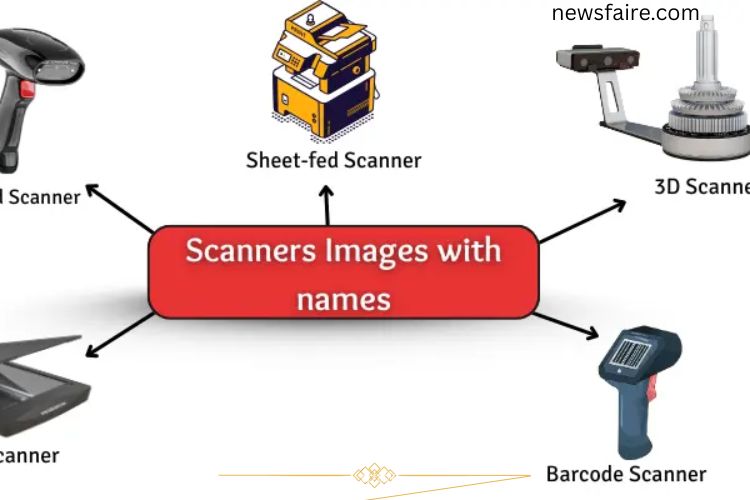
Types of Scanners
Scanners are available in various forms, each designed for specific tasks. Understanding the different types can help you choose the right one for your needs.
Flatbed Scanner
This common type has a flat glass surface where you place documents. It works like a photocopy machine and captures high-quality images. Ideal for photos, books, and single sheets.
Handheld Scanner
Compact and portable, you move this scanner manually over the document. It’s perfect for small or irregularly shaped items.
Sheet-fed Scanner
Paper is automatically fed into this scanner, making it fast for scanning multiple pages. Often used in offices for documents and forms.
Drum Scanner
Uses a spinning drum to capture high-resolution images. It’s primarily used in professional publishing and graphic design.
3D Scanner
Captures real-world objects and converts them into three-dimensional digital models. Useful for design, engineering, and virtual simulations.
Barcode Scanner
Reads barcodes on products, quickly displaying information on a computer. Commonly used in retail and inventory management.
Uses of Scanners in Computer
Scanners serve a wide range of purposes in daily life and professional settings. Their versatility makes them indispensable for managing documents, images, and even objects digitally.
Save Important Documents
Scanners help store legal papers, certificates, or personal documents safely on your computer. Digital backups prevent loss due to damage or misplacement.
Share Pictures
Old family photos or artwork can be scanned and shared instantly with friends, relatives, or online communities.
Make Copies
Scanners allow you to duplicate drawings, notes, or homework quickly without manually rewriting them.
Store Receipts
Scan receipts to track purchases, organize expenses, or maintain records for tax purposes.
Read Barcodes
Retailers and warehouses use barcode scanners to process products efficiently and maintain accurate inventories.
Scan Artwork
Artists and designers can digitize their creations for online portfolios, printing, or client presentations.
Create Digital Books
Libraries and educators use scanners to convert physical books into digital formats, making reading more accessible.
Advantages of Using a Scanner
Scanners provide numerous benefits that improve productivity, organization, and document safety:
- Digital Preservation – Safely store documents and photos on your computer.
- Easy Sharing – Send scanned files instantly via email or cloud storage.
- Backup & Security – Create backups of important papers to prevent loss.
- Photo Restoration – Preserve old images digitally before they degrade.
- Time-Saving – Quickly copy multiple documents in minutes.
- Clear Copies – High-resolution scanning ensures detailed images.
- Work Organization – Keep files organized and searchable.
- Editable Documents – Some scanners allow text editing via OCR software.
- Efficient Record-Keeping – Digital storage replaces bulky filing cabinets.
Disadvantages of Using a Scanner
Despite their advantages, scanners also have some drawbacks:
- Cost – High-quality scanners can be expensive.
- Time-Consuming – Scanning large files or multiple pages takes time.
- Space Requirement – Some scanners, especially flatbed or drum types, occupy significant space.
- Portability – Many scanners are not easy to carry.
- Variable Image Quality – Low-end scanners may produce blurry or pixelated images.
- Software Dependency – Extra software may be required for editing or OCR functions.
- Maintenance – Scanners may need occasional repairs or replacement parts.
- Difficulty with Thick Items – Books or bulky materials may not scan easily.
Frequently Asked Questions:
What is a scanner in a computer?
A scanner is a device that converts physical documents, photos, or drawings into digital files that can be stored, edited, and shared on a computer.
How does a scanner work?
A scanner shines light on the document, captures the image with sensors, and converts it into a digital file that your computer can process.
What are the main types of scanners?
Common types include flatbed, handheld, sheet-fed, drum, 3D, and barcode scanners, each designed for specific scanning tasks.
Can I scan colored photos or documents?
Yes, most modern scanners capture color images with high accuracy, preserving the original details.
Can scanned documents be edited?
Yes, using OCR (Optical Character Recognition) software, scanned text can be converted into editable digital text.
Are scanners useful for businesses?
Absolutely. Scanners help save documents, share files, digitize records, and improve workflow efficiency in offices and retail environments.
Can I scan books or thick materials?
Yes, flatbed scanners can handle books, but very thick or bound books may require special handling to avoid damage.
Conclusion
Scanners are essential tools that bridge the gap between the physical and digital worlds. They preserve important documents, photos, and artwork, making it easy to store, share, and edit files securely on your computer. From home use to professional offices, scanners save time, enhance productivity, and protect valuable information. Choosing the right type of scanner ensures high-quality results, whether you’re digitizing documents, artwork, or even 3D objects.